Display your data; control your data logger


Overview
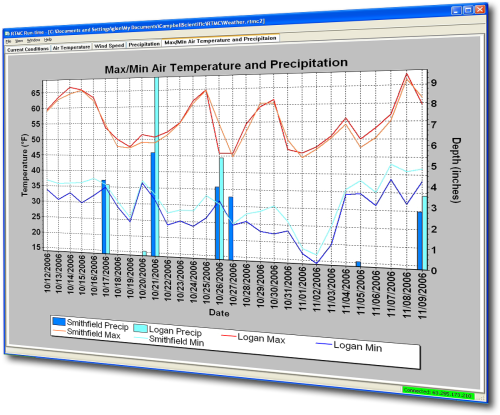
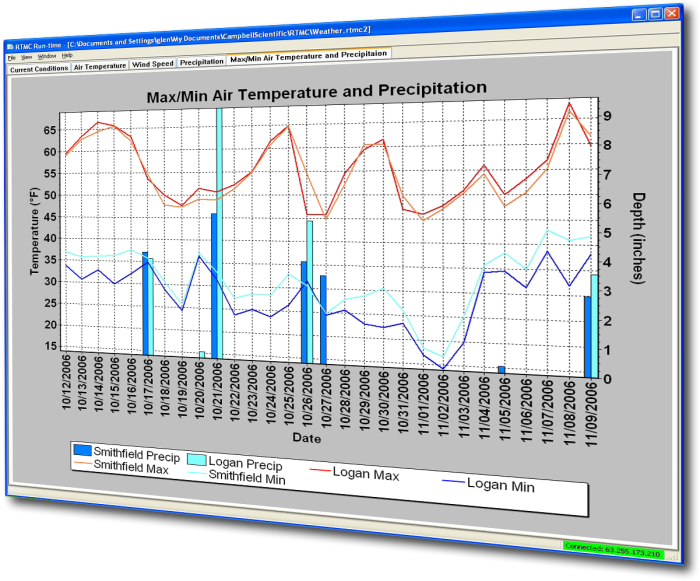
RTMC Pro is used to create and run graphical screens that provide real-time monitor and control capabilities. You can easily design displays using its large library of components including alarms, switches, status bars, charts, and gauges. Simply select a component, place it on the workspace, and specify the data value to be displayed. Each component has properties that can be set by the user giving maximum design control.
This separately purchased product is an enhanced version of the RTMC client that is included with LoggerNet, LoggerNetAdmin, and RTDAQ.
View RTMC Pro demo site for building four of the Campbell Scientific, Logan, Utah campus.
Read MoreBenefits and Features
- Large library of components: alarms, switches, status bars, charts, gages, and more
- Interactive components (switches, drop lists, digital set points, dials) let you toggle flags or set data logger values directly from your RTMC display
- Securely monitor and control your data from virtually anywhere by publishing your RTMC projects to your intranet or the Internet using the included Web Publisher and CSI Web Server
- View data from multiple LoggerNet servers, Campbell Scientific data files, LNDB databases, HTTP data loggers, and virtual data sources all in one RTMC project
- Send email messages or execute programs when alarms are triggered
- Create reports that allow you to easily step through historical data and export an RTMC screen either on a schedule or manually
- Use the extensive math and logic expression library to convert and/or combine your data for display
Images
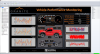
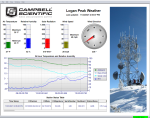
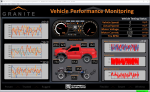
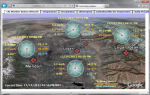
Detailed Description
RTMC Pro, an enhanced version of RTMC, includes a development and a run-time program. Specifically, RTMC Pro provides the following:
- The ability to use LNDB databases, Campbell Scientific data files, HTTP data loggers, virtual data sources, and multiple LoggerNet Servers as data sources
- The CSI Web Server for viewing your data from a web browser
- The ability to generate reports
- More graphical components. For example, more alarms, switches, graphs, gauges, and layout components are available
- Components to run/open a file, run a Cora-Script command (LoggerNet command), or view a web page.
- Images of the project that can be saved and transferred to a web server automatically
- The ability to send email messages or execute programs when alarms occur. Alarm activity can be logged to a file
- More settings for components existing in both RTMC and RTMC Pro, which enables more design control
RTMC Run-Time and the CSI Web Server can run projects created with RTMC Pro's development program. For best compatibility between RTMC or RTMC Pro projects and RTMC Run-Time, the version numbers of the applications should match.
- Projects created with a newer version of RTMC or RTMC Pro will not run in an older version of RTMC Run-Time. As an example, a project created with RTMC Pro 5.0 will not run in RTMC Run-Time 4.0.
- Projects created with an older version of RTMC or RTMC Pro will open and run, but component size or placement may not match the original project, requiring the project to be edited.
An upgrade for RTMC Pro must be purchased separately if you have these earlier versions of RTMC Pro.
Compatibility
Note: The following shows notable compatibility information. It is not a comprehensive list of all compatible or incompatible products.
Data Loggers
| Product | Compatible | Note |
|---|---|---|
| 21X (retired) | The 21X requires three PROMs; two PROM 21X Microloggers are not compatible. | |
| CR10 (retired) | ||
| CR1000 (retired) | ||
| CR1000X (retired) | ||
| CR10X (retired) | RTMC Pro is compatible with the mixed array, PakBus, and TD operating systems. | |
| CR200X (retired) | ||
| CR206X (retired) | ||
| CR211X (retired) | ||
| CR216X (retired) | ||
| CR23X (retired) | RTMC Pro is compatible with the mixed array, PakBus, and TD operating systems. | |
| CR295X (retired) | ||
| CR300 (retired) | ||
| CR3000 (retired) | ||
| CR310 | ||
| CR350 | ||
| CR500 (retired) | ||
| CR5000 (retired) | ||
| CR510 (retired) | RTMC Pro is compatible with the mixed array, PakBus, and TD operating systems. | |
| CR6 | ||
| CR800 (retired) | ||
| CR850 (retired) | ||
| CR9000 (retired) | ||
| CR9000X (retired) |
Additional Compatibility Information
Software
RTMC Run-Time and CSI Web Server can run projects created with RTMC Pro's development program. For best compatibility between RTMC or RTMC Pro projects and RTMC Run-Time, the version numbers of the applications should match.
- Projects created with a newer version of RTMC or RTMC Pro will not run in an older version of RTMC Run-Time. As an example, a project created with RTMC Pro 5.0 will not run in RTMC Run-Time 4.0.
- Projects created with an older version of RTMC or RTMC Pro will open and run, but component size or placement may not match the original project, requiring the project to be edited.
An upgrade for RTMC Pro must be purchased separately if you have these earlier versions.
Computer
RTMC Pro runs on Windows 10 and 11. RTMC Pro runs on both 32-bit and 64-bit versions of these operating systems.
Specifications
| Operating System | Windows 11 and 10 (Both 32- and 64-bit operating systems are supported.) |
| Purchased Separately | Yes, as an enhancement to RTMC |
| Software Level | Intermediate to advanced |
| Scheduled Data Collection Supported | Yes |
| Real-Time Updates | Yes |
| Alarms | Real-time, visual, audible, multilevel alarms possible, alarm log, launch programs, email notifications |
Military Certificate of Networthiness (CoN) |
|
| Certifications |
|
Documents
Brochures
Manuals
Technical Papers



Downloads
To find previously purchased software downloads, log in to the website using the same account the software was purchased under. Navigate to the account's Purchased Software section.
RTMC Pro Patch v.5.0.2 (102 MB) 04-09-2026
This patch upgrades RTMC Pro 5.0 to 5.0.2.
Note: This application requires the Microsoft .Net 4.0 Framework. If it is not already installed on your computer, it can be obtained from the Microsoft Download Center.
RTMC Pro Trial v.5.0.2 (85.7 MB) 04-09-2026
A fully functional 30 day trial version of RTMC Pro (Real Time Monitoring & Control) software for creating custom data displays. RTMC Pro is an enhanced version of RTMC that contains more graphical components, more alarms including email alarm events, run/open, hotspot and snapshot capabilities. The CSI Web Server is also included.
Note: This application requires the Microsoft .Net 4.0 Framework. If it is not already installed on your computer, it can be obtained from the Microsoft Download Center.
RTMC Pro Patch v.4.3.3a (87.7 MB) 05-22-2024
This patch upgrades RTMC Pro 4.0 and newer to 4.3.3a.
Note: This application requires the Microsoft .Net 4.0 Framework. If it is not already installed on your computer, it can be obtained from the Microsoft Download Center.
Frequently Asked Questions
Number of FAQs related to RTMC Pro: 46
Expand AllCollapse All
-
Currently, copying and pasting alarms is the best solution.
-
This can be done by comparing the last time stamp of the value with the current system time within an IIF() function.
-
This information cannot be changed.
-
Shape rotation does not currently work in RTMC Pro. There is a work around, however. Save the shape as an image from the shape property page using the disc icon at the bottom right of the screen. Then load the saved image into an image component that has rotation capabilities.
-
SystemTime returns the current computer time. Timestamp returns the time stamp for an associated record.
-
The snapshots are generated in either instance—whether starting the project from RTMC Developer or RTMC Run-Time.
-
The CSI Web Server can only be configured to be a stand-alone web server. RTMC Run-Time does have the ability to periodically generate web pages from the project and to transfer these files to an FTP server. To use the interactivity that is possible with the CSI Web Server, use iframes in web pages that can reference pages served by the CSI Web Server.
-
RTMC Pro is a development tool for creating an RTMC project that can be deployed to the data logger and served up via the web page. RTMC projects allow the creation of an interface to easily monitor and change variables, etc.
RTMC Pro can be configured to generate images on a timed basis for incorporation in pages served by another web server. Those files can be written directly to a mappable drive or transferred via FTP to a remote server.
Case Studies

Intelligent Infrastructure Systems, a Pennoni company, was contracted to design and install an efficient structural-health......read more
In April of 2015, Sandia National Laboratories (SNL) contracted with Montrose Air Quality Services (MAQS)......read more
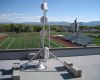
Lightning strikes are a serious concern for school officials who are responsible for protecting the......read more

Hot Springs, Arkansas, is a history-rich city located adjacent to Hot Springs National Park. The......read more

The Channel Tunnel (or Chunnel) connects the United Kingdom with France. It is actually a......read more

To gain access to more reliable weather information, the Port of Tyne added two new weather......read more
Articles and Press Releases
Newsletter Articles
Listed Under
Privacy Policy Update
We've updated our privacy policy. Learn More
Cookie Consent
Update your cookie preferences. Update Cookie Preferences